
FacebookTwitterLinkedIn

English translation by ChatGPT

Ahmed Zayed 2/1/1/1 قصة الجافاسكريبتAhmed Zayed 2/1/1/1 قصة الجافاسكريبت

Course

دورة تدريبية

2/1/1/1 قصة الجافاسكريبت

تطوير المواقع الإلكترونية MEAN-Stack from A to Z مقدمة: الجافاسكريبت Level1

لغة البرمجة JavaScript أو كما يمكن إختصارها لـ JS كما ذكرت من قبل ظهرت الـ JS في عام 1995 و كانت مهمتها تحسين الشكل الخارجي للمواقع عن طريق إضافة بعض الحركة أو التأثيرات البصرية و الصوتية و كانت تستخدم بكثرة في عمل خلفيات متحركة مثل تساقط الورود أو الثلوج حول النصوص و الصور (كانت تلك موضة النصف الثاني التسعينات و بداية الألفينات في تصميم المواقع). أو أن يتحول زر إلي لون مختلف عند المرور عليه بالمؤشر أو أن يتم تكبير صورة عند الضعط عليها كل تلك المؤثرات كانت ثورة في عالم مواقع الإنترنت و كانت وقتها حمي الـ dot com في ذروتها و إنتعاش كبير لوادي السيليكون في الولايات المتحدة الأمريكية و ملايين بل و مليارات الدولارات تنهمر كإستشمارات علي شركات المواقع الإلكترونية

و كانت الـ JS علي بساطتها وقتها هامة لشكل و تصميم المواقع لأنها بالفعل كانت ثورة لآنها و لأول مرة يمكن تنفيذ كود برمجي علي مستوي المتصفح وقتها إشتعلت حرب المتصفحات بين مايكروسوفت و نيتسكيب التي قامت بتطوير الــ JS و ردا عليها قامت مايكروسوفت بتطوير لغة تنفذ علي مستوي المتصفح و أسمتها بـ VbScript و ضمنتها في متصفها internet و explorer و علي الجانب الأخر تبنت باقي الشركات لغة ال JS و حتي بعد ظهور متصفحات أخرى تبنوا لغة الJS بعد فترة خسرت مايكروسوفت حرب المتصفحات و بعدها تخلت عن لغتها VbScript (بل و دعمت أيضا لغة الـ JS و طورتها بل أنها قامت بعمل نسخة محدثة منها تسمي TypeScript سنتطرق لها في المحاضرة الثالثة ) مما جعل لغة JS هي اللغة المهيمنة علي مجال ال front-end و قامت كل الشركات الكبري ببناء مكتبات و أطر عمل قائمة علي الـ JS حتي أصبح الأن حوالي 97% من المواقع الإلكترونية الموجودة علي الإنترنت تم صناعتها بلغة الـ JS و حتي لو لم تكن مصنوعة بالكامل بالـ JS فهي داخلة في تصنيعها بطريقة أو بأخري

و في 2009 كانت القفزة الأخري للغة JS حينما ظهرت بيئة العمل Node JS حيث قامت على محرك جوجل كروم V8 الخاص بتنفيذ أوامر الـ JS علي المتصفح , و لكن كانت الـ Node JS ثورة بالفعل فلأول مرة أصبح بإمكان تنفيذ أكواد لغة JS علي مستوي السيرفر و التعامل مع قواعد البيانات و ملفات النظام و هو ما كانت تعجز عنه من قبل فالأكود التي تتضمن في صفحات الويب لا تعمل الإ علي المتصفح فقط و ليس لها إمكانية وصول للسيرفر و ملفاته و بذلك يمكن إستخدام لغة واحدة لبرمجة موقع إلكتروني ديناميكي (يحتوي علي محتوي متغير يستطيع المستخدم تغيير المحتوي بدون الحاجة لتغيير أكواده البرمجية حيث يتم تسجيل المحتوي إما في قاعدة بيانات أو في ملفات علي السيرفر) بعد أن كان مطورين المواقع الإلكترونية يستخدموا لغة برمجة للـ back-end غير الـ JS بعدها تنامت أهمية الـ JS و دورها في صناعة التطبيقات حتي أنها اليوم أصبحت تقوم بصناعة تقريبا جميع أنواع التطبيقات مثل :

  • المواقع الإلكترونية
  • تطبيقات سطح المكتب
  • تطبيقات الهواتف الذكية
  • تطبيقات الأجهزة الذكية مثل الساعات و اجهزة التلفزيون
  • تطبيقات الـ IoT أو ما يعرف بإنترنت الأشياء :و هو بالفعل سيكون متداخل في جميع الأجهزة التي نستخدمها كل لحظة مثل الغسالات و الثلاجات و حتي المصابيح الكهربائية يمكننا التحكم بكل تلك الأجهزة عن طريق تطبيقات تصنع بلغة JS أيضا
  • التطبيقات التي تتحكم في الروبوتات و الدرونات
  • صناعة الألعاب
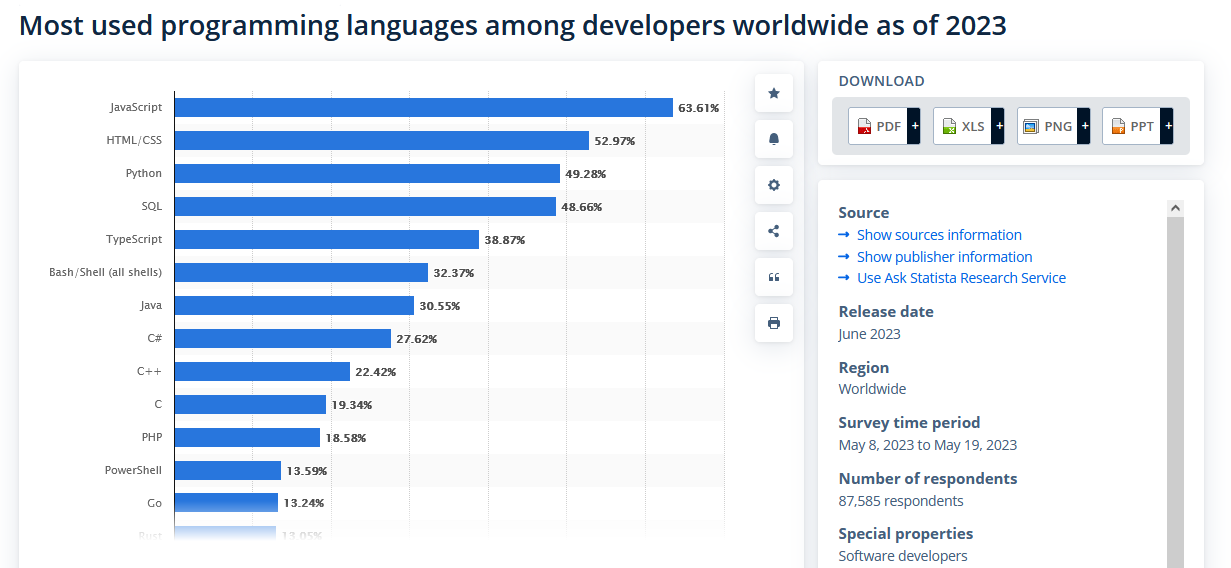
و غيرها من التطبيقات , بالفعل أصبحت الJS هي أكثر لغات البرمجة إستخداما في أيامنا هذه و تبعا لإحصاءات موقع statista فإن ألـ JS هي أكثر اللغات إنتشارا بين المبرمجين meanstack-website-parts

Screen shoot: https://www.statista.com/statistics/793628/worldwide-developer-survey-most-used-languages/

الـ JS علي مستوي الـ front-end

يمكنك كتابة كود الـ JS في نفس ملف الـ HTML إما داخل الـ Head أو داخل الـ Body مثل:
  • الكود في الـ Head
Code

            <!DOCTYPE html>
            <html lang="en">
            <head>
                <meta charset="UTF-8">
                <meta name="viewport" content="width=device-width, initial-scale=1.0">
                <title>Document</title>
                <script>
                   // your JS code here
                </script>
            </head>
            <body>
            </body>
            </html>
        
  • الكود في الـ Body
Code

        <!DOCTYPE html>
        <html lang="en">
        <head>
            <meta charset="UTF-8">
            <meta name="viewport" content="width=device-width, initial-scale=1.0">
            <title>Document</title>
        </head>
        <body>
            <script>
                // your JS code here
             </script>
        </body>
        </html>
    

الفرق بين الطريقتين , في الطريقة الأولي عندما يكتب في الـ Head يتم تنفيذ الكود قبل أن يتم تحميل عنصر الـ Body و العناصر الموجودة بداخله, بينما عندما ينفذ الكود في أخر الـ Body ينفذ الكود بعد تحميل الـBody و عناصره (أيضا يمكن كتابته وسط عناصر الـ Body و ينفذ الكود بعد تحميل العناصر التي سبقته في ترتيب الكتابة) او يمكن كتابة كود الـ JS في ملف منفصل عن ملفات الـ HTML عن طريق إنشاء ملف يكون إمتداده .js و يتم دمجه في ملف الـ HTML فبدلا من كتابة كود الـ JS بهذه الطريقة

Code

      
            <script>
                // your JS code here
             </script>
      //يتم استدعائه بهذه الطريقة
      <script src="index.js"></script>
    

حيث أن src اختصار لـ source و تشير إلي مسار الملف في المشروع و أيضا يمكن وضعه في الـ head أو الـ body

يستطيع كود الـ JS التعامل مع ثلاثة Objects أو أماكن بالمعني المجازي و هم:

DOM (Document Object Model)

و هو عبارة عن Object يحتوي علي صفحة الـ HTML بكل مكوناتها و يستطيع كود الـJS التحكم بكل مكونات الصفحة مثلا أن يغير النصوص في عنصر معين , او حذف عنصر أو تعديل عنصر أو تغيير تنسيق عنصر (style) و يستخدم الـ object المسمي بـ document للوصول لعناصر صفحة الـ HTML مثال: إذا أردت تغيير لون كتابة عنصر العنوان الرئيسي في الصفحة h1 للون الأحمر مثلا

Code

    <!DOCTYPE html>
<html lang="en">
<head>
    <meta charset="UTF-8">
    <meta name="viewport" content="width=device-width, initial-scale=1.0">
    <title>Document</title>
</head>
<body>
    <h1> my title </h1>
    <script>
       document.querySelector('h1').style.color='red';
     </script>
</body>
</html>

في المثال السابق استخدمنا قمنا بالدخول للـ document و بعدها استخدمنا الفنكشن الخاصة بالبحث عن عنصر داخل الـ html document و التي تسمي querySelector و نقوم بتمرير اسم العنصر لها "h1” في حالتنا , في حالة اذا اردنا الوصول لعنصر عن طريق الـ ID نقوم بتغيير الكود كالتالي:

Code

        document.querySelector('#elementId').style.color='red';
و اذا أردنا الوصول لعنصر أو عناصر بإسم الـ style يكون الكود بهذا الشكل:
Code

        document.querySelector('.elementStyleName').style.color='red';

يلاحظ عند استخدام الفانكشن querySelector تقوم باحضار أول عنصر فقط يحمل الإسم أو ال Id أو اسم الستايل و القيام بتنفيذ الكود عليه , هي فانكشن تقوم بإستدعاء أول عنصر فقط أما إذا أردنا التعامل مع كل العناصر سنتطرق لذلك لاحقا بفانكشن أخرى.

أيضا يمكننا التفاعل مع المستخدم عن طريق عناصر ادخال البيانات <input> مثل استقبال البيانات و إجراء العمليات عليها مثلا
Code

       
        <!DOCTYPE html>
        <html lang="en">
        <head>
            <meta charset="UTF-8">
            <meta name="viewport" content="width=device-width, initial-scale=1.0">
            <title>Document</title>
        </head>
        <body>
            <input type="text" id = "name" value=""/> 
            <input type="button" value="Say welcome" onclick="SayWelcome()">
            <label  id = "welcome"  ></label>
        
            <script> 
                 function SayWelcome(){
                    var myName =   document.querySelector('#name').value;
             var welcomeLabel =   document.querySelector('#welcome');
             welcomeLabel.innerHTML  = 'welcome : ' + myName  ;
                }
             </script>
        </body>
        </html> 
            

Console

هو جزء داخل المتصفح يتم تسجيل فيه الأحداث و الأخطاء التي تحدث عند تنفيذ الكود أو استخدامه في إختبار الكود و يمكن تنفيذ الكود بداخله عن طريق استخدام الـ Object المسمى بـ console مثلا عند كتابة رسالة به مثلا نقوم بكتابة

Code

        console.log('my message');

BOM (Browser Object Model)

و هو الـ object الذي يتعامل مع الـ المتصفح ككل و يحتوي بداخله جميع الـ Objects الأخري و يمكن التعامل معه بالكلمة window فمثلا إذا أردنا كتابة رسالة تحذيرية مثلا تظهر للمستخدم يمكننا كتابتها بالشكل التالي:

Code

        window.alert('my message');
او مثلا اذا اردنا فتح tab جديدة في المتصفح يمككنا استخدام الكود التالي:
Code

        window.open('http://google.com','_blank');
كما ذكرت من قبل أن الـ BOM يحتوي علي جميع الـ Objects الخاصة بالـ JS فيمكن الوصول لأي object من داخل الـ window مثلا يمكن كتابة window.document.(any function) أو مثلا window.console.log و مما يعني أن الـ window تحتوي علي الـ document و الـ console إذا لماذا نستطيع الوصول للـ object document و الـ object console دون كتابة window أولا , لانه ببساطة بما أن كل العناصر في تحت الـ window فيمكننا عدم كتابة window حتي الأمثلة التي قمنا بكتابتها من قبل يمكن أن تكتب بهذه الطريقة بالشكل التالي:
Code
alert('my message');
او مثلا اذا اردنا فتح tab جديدة في المتصفح يمككنا استخدام الكود التالي:
Code

            open('http://google.com','_blank');
          
و سيعمل الكود بشكل طبيعي

1/1/1/2 The Story of JavaScript

Web Development Introduction: JavaScript Level 1

The programming language JavaScript, or JS for short, as mentioned before, appeared in 1995. Its task was to improve the appearance of websites by adding some movement or visual and audio effects. It was widely used to create animated backgrounds, such as falling roses or snow around text and images (this was a trend in the late 1990s and early 2000s in web design). Or, for example, a button changing color when hovered over or an image enlarging when clicked. All these effects were revolutionary in the world of websites, and at that time, the dot-com boom was at its peak, with a significant revival in Silicon Valley in the United States, and millions, even billions, of dollars pouring in as investments in web companies.

JavaScript, despite its simplicity at the time, was important for the look and design of websites because it was indeed a revolution. For the first time, code could be executed at the browser level. At that time, the browser wars between Microsoft and Netscape, which developed JavaScript, were raging. In response, Microsoft developed a language that could be executed at the browser level, called VbScript, and included it in its Internet Explorer browser. On the other hand, other companies adopted JavaScript. Even after the emergence of other browsers, they adopted JavaScript. After a while, Microsoft lost the browser wars and later abandoned its VbScript language (and even supported JavaScript and developed an updated version called TypeScript, which we will discuss in the third lecture). This made JavaScript the dominant language in the front-end field, and all major companies built libraries and frameworks based on JavaScript. Today, about 97% of websites on the internet are made using JavaScript, and even if they are not entirely built with JavaScript, it is involved in their development in one way or another.

In 2009, JavaScript took another leap forward with the emergence of Node.js, which was built on Google Chrome's V8 engine for executing JavaScript commands in the browser. Node.js was indeed a revolution because, for the first time, JavaScript code could be executed at the server level, allowing interaction with databases and system files, which was previously impossible. Code embedded in web pages only worked in the browser and had no access to the server or its files. Now, a single language could be used to program a dynamic website (containing variable content that users could change without needing to modify the code, as the content is stored either in a database or in files on the server). Previously, web developers used a different programming language for the back-end, not JavaScript. After that, the importance and role of JavaScript in application development grew, and today it is used to create almost all types of applications, such as:

  • Websites
  • Desktop Applications
  • Smartphone Applications
  • Smart Device Applications such as watches and TVs
  • IoT (Internet of Things) Applications, which will indeed be integrated into all the devices we use every moment, such as washing machines, refrigerators, and even light bulbs. We can control all these devices through applications made with JavaScript.
  • Applications that control robots and drones
  • Game Development
And other applications. Indeed, JavaScript has become the most widely used programming language today. According to statistics from Statista, JavaScript is the most popular language among developers. meanstack-website-parts

Screenshot: https://www.statista.com/statistics/793628/worldwide-developer-survey-most-used-languages/

JavaScript at the Front-End Level

You can write JavaScript code in the same HTML file, either inside the <head> or <body<, like:
  • Code in the <head>
Code


<!DOCTYPE html>

<html lang="en">

<head>

<meta charset="UTF-8">

<meta name="viewport" content="width=device-width, initial-scale=1.0">

<title>Document</title>

<script>

// your JS code here

</script>

</head>

<body>

</body>

</html>

  • Code in the <body<
Code


<!DOCTYPE html>

<html lang="en">

<head>

<meta charset="UTF-8">

<meta name="viewport" content="width=device-width, initial-scale=1.0">

<title>Document</title>

</head>

<body>

<script>

// your JS code here

</script>

</body>

</html>

The difference between the two methods is that in the first method, when the code is written in the <head>, it is executed before the <body< and its elements are loaded. On the other hand, when the code is executed at the end of the <body<, it runs after the <body< and its elements are loaded. (You can also write it in the middle of the <body< elements, and the code will execute after the elements that precede it in the writing order.) Alternatively, you can write JavaScript code in a separate file from the HTML files by creating a file with a `.js` extension and integrating it into the HTML file. Instead of writing JavaScript code like this:

Code


<script>

// your JS code here

</script>

// It is called this way:

<script src="index.js"></script>

Where `src` is short for `source` and refers to the file path in the project. It can also be placed in the <head> or <body<.

JavaScript code can interact with three objects or places in a metaphorical sense:

DOM (Document Object Model)

This is an object that contains the HTML page with all its components. JavaScript code can control all the components of the page, such as changing the text in a specific element, deleting an element, modifying an element, or changing the style of an element. The object called `document` is used to access the elements of the HTML page. For example:

If you want to change the color of the main heading element in the page (`h1`) to red, for example:

Code


<!DOCTYPE html>

<html lang="en">

<head>

<meta charset="UTF-8">

<meta name="viewport" content="width=device-width, initial-scale=1.0">

<title>Document</title>

</head>

<body>

<h1> my title </h1>

<script>

document.querySelector('h1').style.color='red';

</script>

</body>

</html>

In the previous example, we used the `document` object and then used the function to search for an element inside the HTML document, which is called `querySelector`. We passed the element name `"h1"` to it. If we want to access an element by its `ID`, we change the code as follows:

Code


document.querySelector('#elementId').style.color='red';

And if we want to access an element or elements by their class name, the code would look like this:

Code


document.querySelector('.elementStyleName').style.color='red';

Note that when using the `querySelector` function, it only retrieves the first element with the specified name, ID, or class and executes the code on it. It is a function that only calls the first element. If we want to deal with all elements, we will discuss that later with another function.

We can also interact with the user through input elements like `<input>`, such as receiving data and performing operations on it. For example:

Code


<!DOCTYPE html>

<html lang="en">

<head>

<meta charset="UTF-8">

<meta name="viewport" content="width=device-width, initial-scale=1.0">

<title>Document</title>

</head>

<body>

<input type="text" id="name" value=""/>

<input type="button" value="Say welcome" onclick="SayWelcome()">

<label id="welcome"></label>

<script>

function SayWelcome() {

var myName = document.querySelector('#name').value;

var welcomeLabel = document.querySelector('#welcome');

welcomeLabel.innerHTML = 'welcome : ' + myName;

}

</script>

</body>

</html>

Console

This is a part of the browser where events and errors that occur during code execution are logged. It can also be used to test code by executing it directly. For example, to log a message, we can write:

Code


console.log('my message');

BOM (Browser Object Model)

This is the object that interacts with the browser as a whole and contains all other objects. It can be accessed using the keyword `window`. For example, if we want to display a warning message to the user, we can write it as follows:

Code


window.alert('my message');

Or, for example, if we want to open a new tab in the browser, we can use the following code:

Code


window.open('http://google.com','_blank');

As mentioned earlier, the BOM contains all the objects related to JavaScript. Therefore, you can access any object from within the `window`. For example, you can write `window.document.(any function)` or `window.console.log`. This means that the `window` contains the `document` and `console`. So why can we access the `document` and `console` objects without writing `window` first? Simply because all elements are under the `window`, so we can omit writing `window`. Even the examples we wrote earlier can be written this way:
Code

    
    alert('my message');


Or, for example, if we want to open a new tab in the browser, we can use the following code:

Code

    
    open('http://google.com','_blank');


And the code will work normally.

February 26, 2025

Read More
إقرأ المزيد

دورة تدريبية

Course

7/2/1/1 أساسيات الجافاسكريبت 'الـ Functions'

1/1/2/7 JavaScript fundamentals 'Functions'

ما هي الشروط التى يجب توافرها لتطوير موقع إلكتروني متميز؟

What are the conditions that must be met to develop a distinguished website?

دورة تدريبية

Course

6/2/1/1 أساسيات الجافاسكريبت 'التكرارات أو الدورات Loops'

1/1/2/6 JavaScript fundamentals 'Loops'

مشكلة التسويق الرقمي بين الإختزال و الأوهام

The Problem of Digital Marketing Between Reductionism and Illusions

دورة تدريبية

Course

1/1/1/1 قصة المواقع الإلكترونية منذ البداية

1/1/1/1 The Story of Websites From the Beginning

Keywords
كلمات مفتاحية

دورة الأنجولر بالعربي دورة النود بالعربي دورة تطوير المواقع الإلكترونية دورة الـ mean-stack from a to z mean-stack دورة الـ

angular arabic coursenode js arabic courseweb development coursecourse mean-stack from a to zcourse mean-stack from a to zmean-stack course

© 2026 Ahmed Zayed. All rights reserved.© 2026 كل الحقوق محفوظة أحمد زايد